# Plugins

# Joker.com WHMCS Plugin

## WHMCS Registrar Module

![](https://joker.com/faq/uploads/images/gallery/FAQ_media/Reseller%20docs/res-whmcs.png)

[WHMCS](https://www.whmcs.com/ "WHMCS") is a popular web hosting and automation solution, which includes billing and support options. If you are using WHMCS for your hosting activities, you may interface Joker.com with WHMCS' domain functionality to easily order and manage domains from within WHMCS. <sup>1)</sup>

Joker.com maintains a registrar module for WHMCS, which offers a great load of features to interface Joker.com seamlessly from within WHMCS.

<p class="callout success">The latest Plugin version is always available on our [GitHub ](https://github.com/joker-registrar/joker-whmcs/releases "Joker.com GitHub Account")account.</p>

The following registrar core functionality is provided:

- register domains
- initiate transfers
- perform renewals
- allow viewing and changing of nameservers
- allow viewing and changing of WHOIS information of domains
- usable with any <abbr class="glossary" title="Top Level Domain">TLD</abbr> Joker.com offers
- <abbr class="glossary" title="Top Level Domain">TLD</abbr> &amp; Pricing Sync

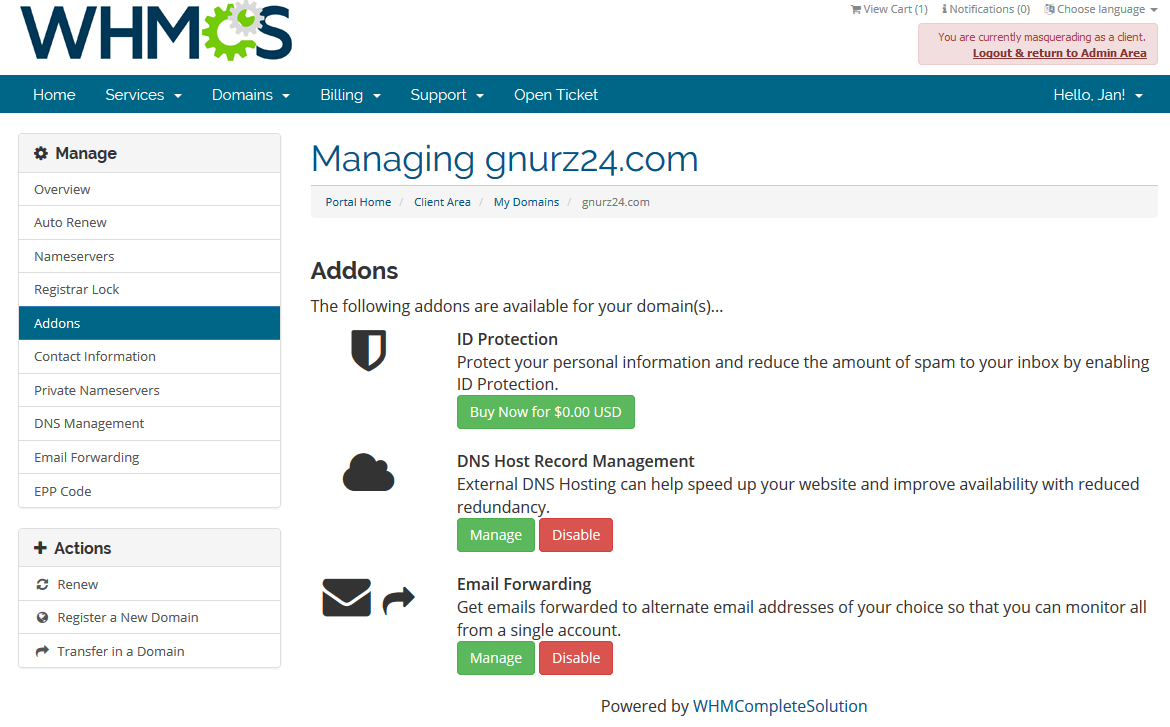
![](https://joker.com/faq/uploads/images/gallery/FAQ_media/Reseller%20docs/res-whmcs-Client%20Area.png)

Additionally, also these features are provided:

- create/edit email forwards
- create/edit <abbr class="glossary" title="Domain Name Server">dns</abbr> records for joker-ns
- fetch auth id ("EPP Code")
- sync of expiration date
- order whois privacy protection with domain registration, transfer and renewal
- switch easily between production and testing environment (OT&amp;E)

#### Installation:

Please extract the contents of the **ZIP archive** which you will find at the top left of this page into the folder

***modules/registrars/joker/***

of your **WHMCS** installation.  
In case you want to register **.FI** domains, please add the contents of the file "**additionalfields.txt**" to "**resources/domains/additionalfields.php**".  
In case you are registering **.EU** domains, please note that as of plugin version **1.3.4** you should remove the **"\[.eu\]"**-section from "**resources/domains/additionalfields.php**", since they now have been implemented by WHMCS directly.  
The configuration of the Joker.com registrar module is done by using the **WHMCS admin section**. For this, please login as "admin" into your WHMCS installation, and navigate to

**Setup -&gt; Products/Services -&gt; Domain Registrars**  
  
Pick "Joker.com" from the list, "Activate" the plugin, and enter your Joker.com  
Reseller's credentials - **the same you are using for DMAPI**.

Alternatively, you also may use Joker.com API keys.

  
You also may choose to use the "TestMode" for dry run on our OT&amp;E platform, or to configure the free Joker.com nameservers as a default for new domains.

  
Once activated, you may always change these settings by clicking on "Configure".  
Don't forget to "Save Changes" after doing so.

#### Usage:

  
You will find most options for domains in section "**Clients -&gt; Domain registrations**" - **click on the domain name** to see all domain details.  
A special command there is "**Sync**" at the '**Registrar Commands**' - this will trigger a manual sync of a domain's status and expiration date with Joker.com, in case it was modified outside of WHMCS.

This is usually also done automatically by the '**WHMCS domainsync cron**' - please make sure that you added this with your WHMCS installation.  
  
Please send us your feedback: <reseller-support@joker.com>  
Enjoy!

<sup>1)</sup> the WHMCS plugin is provided "as-is" without any further obligation or promise of quality or reliability. The normal Joker.com Terms &amp; Conditions apply. WHMCS Limited is responsible for the functionality and availability of the WHMCS system.

**Versions**

<details id="bkmrk-version-history-new-"><summary>Version History</summary>

New in version 1.3.7

- fixed Joker.com DNS list

New in version 1.3.6

- fixed DMAPI get-transfer-auth-id request

New in version 1.3.5

- optimized DMAPI timings

New in version 1.3.4

- changed Joker.com default nameservers to the new ones
- added support for the .EU contact extensions

New in version 1.3.3

- added premium renewal price update in manual sync

New in version 1.3.2

- added support for language of <abbr class="glossary" title="Internationalized Domain Names">IDN</abbr> domains

New in version 1.3.1

- added support for .eu country of citizenship
- added use of WHMCS admin contact

New in version 1.3.0

- added support for <abbr class="glossary" title="Top Level Domain">TLD</abbr> &amp; Pricing Sync

New in version 1.2.5

- added support for premium domains

New in version 1.2.4

- fixed issue with domain syncronisation cron

New in version 1.2.3

- fixed issue with puny code in the domain availability check

New in version 1.2.2

- fixed an issue with .uk domain contacts

New in version 1.2.1

- fixed some issues with the domain availability check

New in version 1.2.0

- added dnssec management

New in version 1.1.5

- fix for .eu expiration date / redemption grace period problem

New in version 1.1.4

- added account balance check for domain transfers
- added a config option to enable automatic restore from redemption grace period if renew is not possible

New in version 1.1.3

- added account balance check for domain renewals

New in version 1.1.2

- fixed contact information change for WHMCS 7.x

New in version 1.1.1

- fixed toggling of id protection

New in version 1.1.0

- domain availability check
- own CRON job script, for registration status check

New in version 1.0.4:

- use API key instead of user/password credentials
- maintain privacy settings for domain

</details>**This version has been tested with WHMCS 6.x, WHMCS 7.10.2 and WHMCS 8.13.1**

## Simple WHMCS Plugin

This is a very light weight and simple plugin, therefore very easy to install (you will find instructions in the readme of the zip archive below).

However, features are basic, and you have to configure a fixed set of contact handles for each <abbr class="glossary" title="Top Level Domain">TLD</abbr> you want to use.

Any <abbr class="glossary" title="Top Level Domain">TLD</abbr> of Joker.com should work.

This plugin is provided as an example to show, how easy it is to connect Joker.com to WHMCS using DMAPI. You may also use it as a starting point for your own experiments**.**

**For a full integration of Joker.com into WHMCS**, please use our official fully-featured Joker.com WHMCS Registrar Module.

# Clientexec Registrar Plugin

[Clientexec](https://www.clientexec.com/ "Clientexec") is a popular web hosting and automation solution, which includes billing and support options.[![2020-02-20 14_23_21-Clientexec - Manage Your Hosting Business.png](https://joker.com/faq/uploads/images/gallery/FAQ_media/Reseller%20docs/res-Clientexec%20-%20Manage%20Your%20Hosting%20Business-small.png "Clientexec Joker.com Registrar Module")](https://clientexec.com "Clientexec")

If you are using Clientexec for your hosting activities, you may interface Joker.com with Clientexec domain functionality to easily order and manage domains from within Clientexec. <sup>1)</sup>

Joker.com maintains a registrar module for Clientexec, which offers a great load of features to interface Joker.com seamlessly from within Clientexec:

The following registrar core functionality is provided:- domain availability check

- domain registration
- domain transfer
- domain renew
- domain transfers
- set autorenew
- set registrar lock
- set nameservers
- modify <abbr class="glossary" title="Domain Name Server">dns</abbr> zone records (if joker nameservice is used)
- pricelist
- domain import

![](https://joker.com/faq/uploads/images/gallery/FAQ_media/Reseller%20docs/res-Clientexec%20-%20Manage%20Your%20Hosting%20Business-big.png "Clientexec Joker.com Registrar Module")**Installation:**

The installation is easy, **the plugin is already included with each copy of Clientexec**, just activate the "Joker.com plugin" from within Clientexec:

***Settings =&gt; Plugins =&gt; Registrars***: Select "Joker.com" from the list, and enter your **Joker.com API key**.


### Usage:

Create customers, and register domains with "**Packages =&gt; Order Domain Services**"...

**Known Issues:**

- <abbr class="glossary" title="Internationalized Domain Names">IDN</abbr> domains are currently not supported <sup>\*)</sup>
- some ccTLDs may not supported by default
- Premium domains are currently not supported <sup>\*)</sup>

<sup>\*)</sup> this is a limitation of Clientexec

  
Please send us your feedback: <reseller-support@joker.com>  
Enjoy!

<sup>1)</sup> the Clientexec plugin is provided "as-is" without any further obligation or promise of quality or reliability. The normal Joker.com Terms &amp; Conditions apply.

**Version History**

- 1.0 initial release

# Hostbill Registrar Plugin

[![](https://joker.com/faq/uploads/images/gallery/FAQ_media/Reseller%20docs/res-HostBill_Joker.png "Hostbill Joker.com Plugin")](https://hostbillapp.com/ "Hostbill Joker.com Plugin")

[Hostbill ](https://hostbillapp.com/ "Hostbill")is a popular web hosting and automation solution, which includes:

- Hosting Automation
- Client Management
- Help Desk System
- Automated Billing
- Domain Management

If you are using Hostbill for your hosting activities, you can integrate Joker.com for the domain management within Hostbill using the Joker.com plugin. <sup>1)</sup>

At [Hostbill's Joker.com-plugin page](https://hostbillapp.com/hostbill/domainmanagement/registrars/joker.com/ "Hostbill Joker.com Plugin") you find an overview of what is provided by our module:

- **Registration**  
    Automated domain registration. When enabled, domain module connects registrar API to register new domain name ordered by client.
- **Transfer**  
    Automated domain transfers. Customers can request domain transfer from other registrar to you. During signup customers are asked for EPP/transfer code used in transfer process.
- **Renew**  
    Automated domain renewals. Renew function gives the ability to renew the domain name by customer-purchased period when domain is about to expire
- **Synchronize**  
    Registry &lt;-&gt; HostBill synchronization. Domain synchronization allows your staff members to update HostBill domain records with registry details, ie. to make sure that domain renewal/expiration dates are in sync.
- **Import**  
    Automatically import existing domains from Registry -&gt; HostBill.
- **Premium names**  
    Get premium domain price on registration page and register premium domain names
- **Lookup engine**  
    Use registry API as lookup engine for fast &amp; accurate domain searches
- **Manage contacts**  
    Update domain registration contacts. Customers can manage contact details related to domains they have registered with you.
- **DNSSEC Management**  
    Allow your customer to manage his domains DNSSEC keys at registry
- **Get EPP Code**  
    This functionality lets your clients get domain EPP Code, allowing to transfer domain out.
- **ID Protection**  
    This feature enables your customers to protect identity of their contact details stored.
- **Update Nameservers**  
    Customers have the ability to change nameservers the domain is pointing to.
- **Register Nameservers**  
    Clients can register their custom name servers using domain registrar API.

### Installation:

The installation is easy, **the plugin is already included with Hostbill**, just activate the "Joker.com plugin" from within Hostbill:

**Select Settings -&gt; Modules -&gt; Domain Modules**, choose Joker.com from the list and "activate".

### Usage:

Please find an easy step-by-step documentation at [Hostbill's Joker.com plugin wiki](https://hostbill.atlassian.net/wiki/spaces/DOCS/pages/754647053/Joker.com "Hostbill Joker.com Plugin").

Please send us your feedback: <reseller-support@joker.com>  
Enjoy!

<sup>1)</sup> the Hostbill plugin is provided without any further obligation or promise of quality or reliability. The normal Joker.com restriction conditions apply.