# Transferring Domains to Joker.com

According to ICANN regulations, when transferring domains between registrars, the Gaining Registrar (Joker.com) must initiate the process. To begin, Joker.com needs to obtain express authorization from either the Registered Name Holder or the Administrative Contact. This authorization is fulfilled by possessing the AUTH-ID. You can find more information about the transfer policy here: [https://www.icann.org/resources/pages/transfer-policy-2016-06-01-en](https://www.icann.org/resources/pages/transfer-policy-2016-06-01-en)

**The transfer policies and rules may vary from registry to registry, for more information and examples please also refer to our [Specific ccTLDs: Transfers article](https://joker.com/faq/books/jokercom-faq-en/page/specific-cctlds-transfers).**

### Prepare for the Transfer

- Check with your current/old registrar
- Make sure your domain is "unlocked" and eligible "change of registrar"
- Request the AUTH-ID (also known as the 'epp-code') for the domain you want to transfer.

<p class="callout info">**Note:** Generally, the domain must be registered for at least 60 days before a transfer is possible.</p>

### Initiate the Transfer

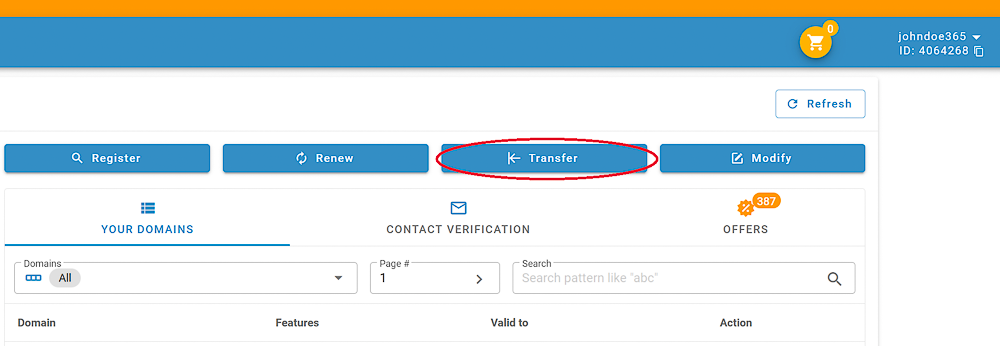
##### 1. Log in, and click the "Transfer a Domain to Joker.com" button:  

![](https://joker.com/faq/uploads/images/gallery/FAQ_media/Transfer/transfer_in-1.png)


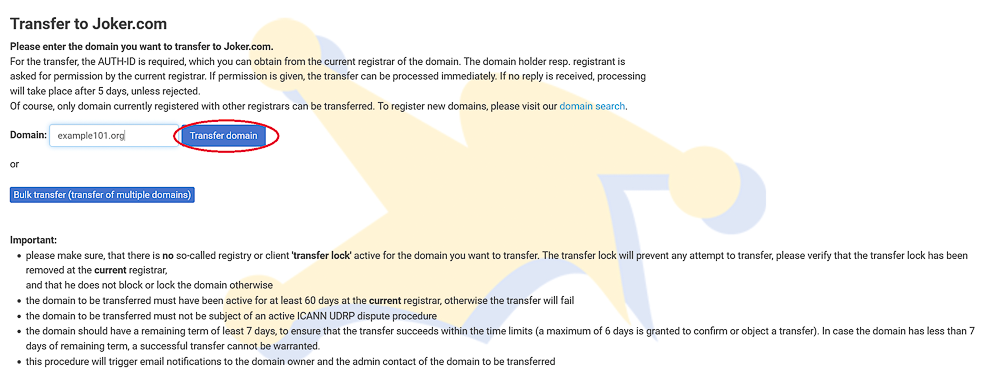
##### 2. Enter the domain name you want to transfer (without "www."), click "Transfer Domain"
![](https://joker.com/faq/uploads/images/gallery/FAQ_media/Transfer/transfer_in-2.png)


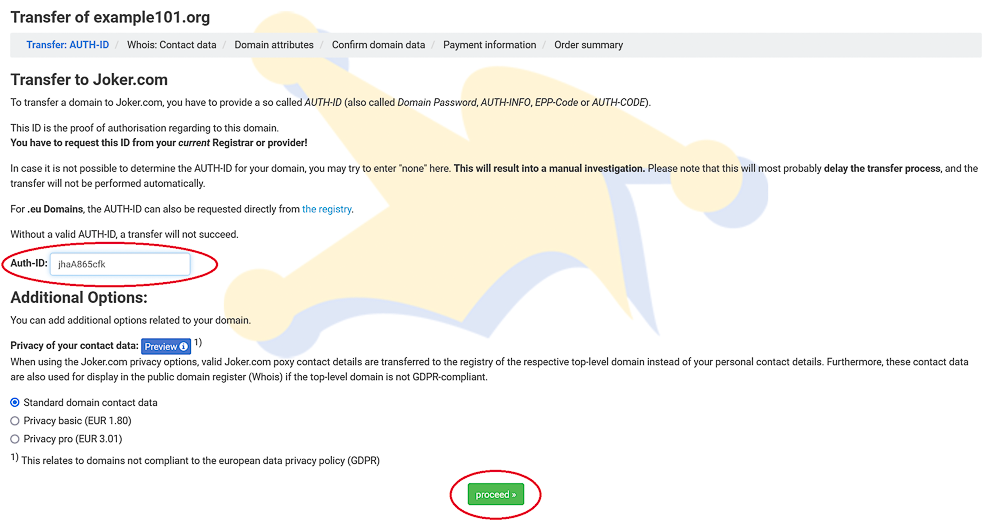
##### 3. Enter the AUTH-ID (epp-code) obtained from your current Registrar, click "Proceed":  

![](https://joker.com/faq/uploads/images/gallery/FAQ_media/Transfer/transfer_in-3.png)


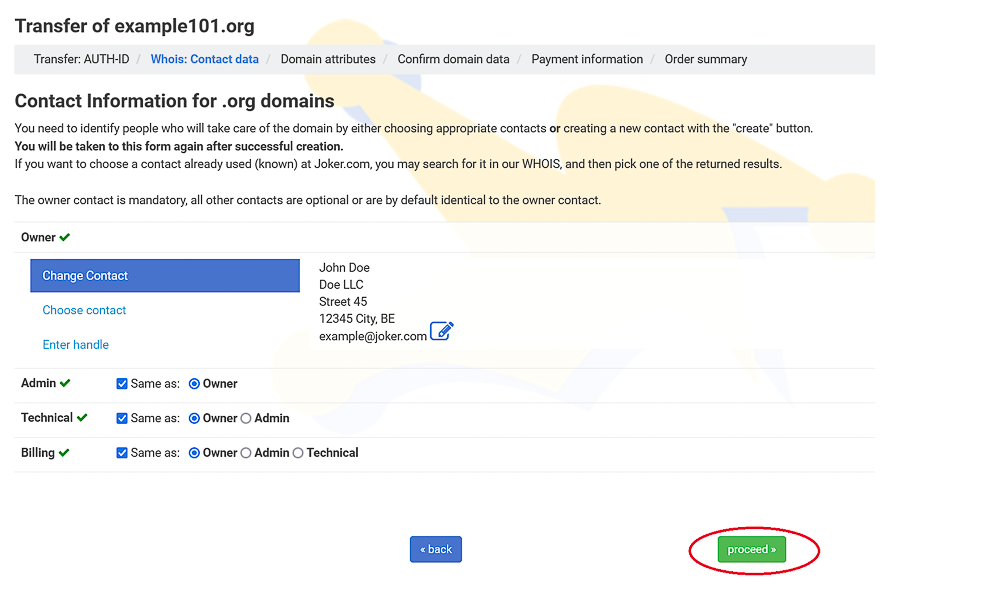
##### 4. Add the contacts:

![](https://joker.com/faq/uploads/images/gallery/FAQ_media/Transfer/transfer_in-4.png)

You can either create new contacts, or use already existing. See also:

[What are Domain Contacts?](https://joker.com/faq/books/jokercom-faq-en/page/what-are-domain-contacts)

[Creating and Modifying Contacts](https://joker.com/faq/books/jokercom-faq-en/page/creating-and-modifying-contacts)

<p class="callout info">**Please note:** due to GDPR regulations and technical reasons, we cannot automatically transfer your existing domain contact data.</p>


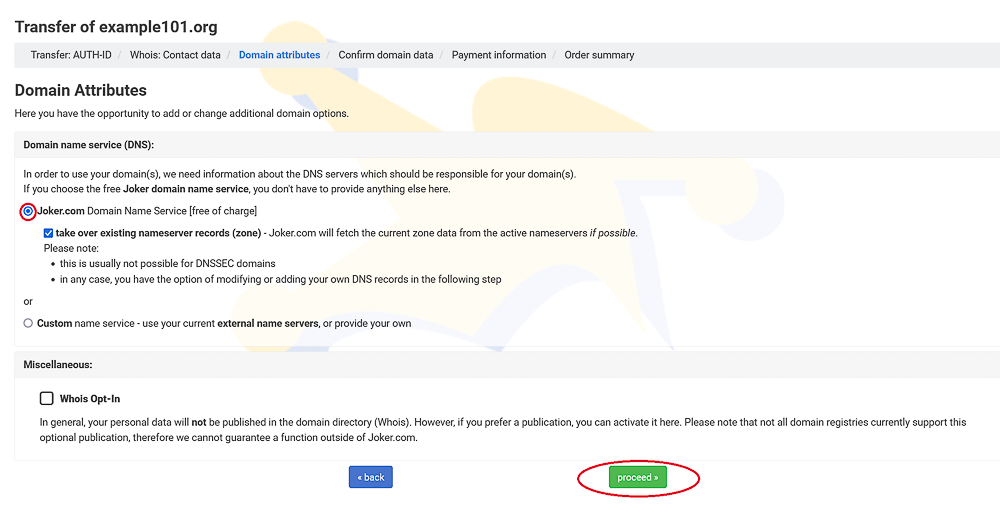
##### 5. Choose your nameservice:

![](https://joker.com/faq/uploads/images/gallery/FAQ_media/Transfer/transfer_in-5.png)

<p class="callout info">**Tip:** If you are currently using the name service of the initial registrar, it is best to choose our equivalent, the free Joker.com name service. Our system will attempt to read and accept your current name server entries. You can add and confirm them before starting the transfer: click on "edit DNS records" on the next page.</p>

You may also consider using our **free [DNSSEC](https://joker.com/faq/books/jokercom-faq-en/page/dnssec "DNSSEC")** option for secure name services.


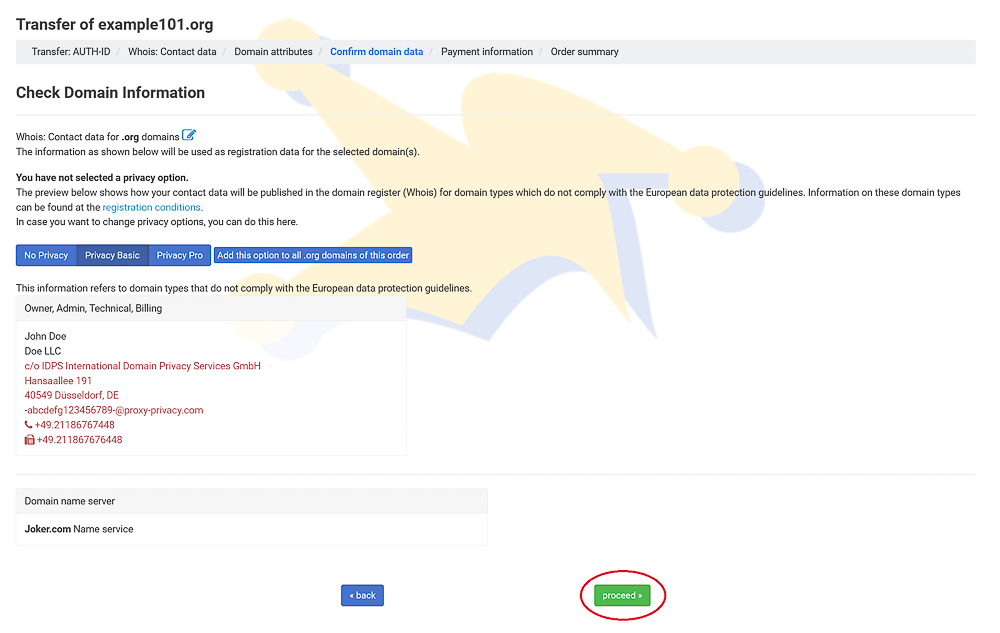
##### 6. Add privacy service, if desired:
![](https://joker.com/faq/uploads/images/gallery/FAQ_media/Transfer/transfer_in-6.png)

More info about our [Privacy Service](https://joker.com/faq/books/jokercom-faq-en/page/privacy-services).


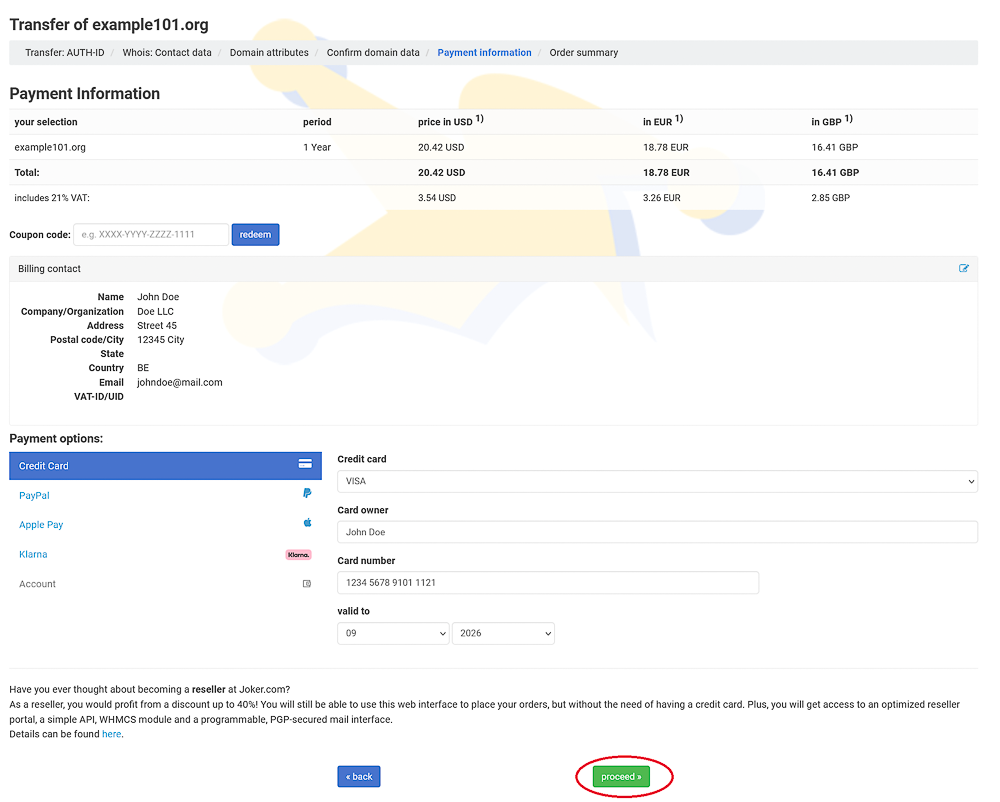
##### 7. Enter your payment details, and click "Proceed":
![](https://joker.com/faq/uploads/images/gallery/FAQ_media/Transfer/transfer_in-7.png)


### Processing the Transfer

Once we have received the AUTH-ID and other required information, we will charge you for the transfer. If the attempt is successful, we will forward the transfer request to the registry. The registry will then notify your current (old) registrar.

Your current (initial) registrar may have their own verification procedures. They might ask you, the owner, and/or the admin contact to verify the transfer via email or other means. Be cautious with emails from your old registrar, as some may be confusing or appear as spam. It's important to respond appropriately to these emails, as failure to do so could result in a denied transfer.


### Finishing the Transfer

**After a maximum of 5 days**, we will receive a notification from the registry regarding the success or failure of the transfer. We will inform you immediately once we receive this notification. If the transfer is successful, you can start using the domain right away.

However, please note that after a successful transfer, the **domain will be locked for 60 days** to prevent another transfer. This is part of the transfer policy.

If you encounter any issues during the transfer, please don't hesitate to contact us. Choose the topic 'transfer - move the domain to Joker.com,' or email us at *<transfer@joker.com>*


### Cost of Domain Transfers

---

When you transfer a domain from another registrar to Joker.com, an additional one-year term will be added to the domain. **You will only be charged for this one-year renewal** if the transfer is successful, and there won't be any additional transfer costs.

For most gTLDs (generic top-level domains), this extra year of registration will be added to your current domain term. This means you won't lose any remaining time from your current registration. However, there are **exceptions**, which are explained below.

**Here's an example:**

Let's say your domain has 7 months left until it expires when you transfer it to us. If the transfer is successful, your domain will expire in 1 year + 7 months, which equals 19 months.

Please note that the fee for the transfer is non-refundable if the transfer fails due to a reason not caused by Joker.com.

**Exceptions:**

If you transfer your **.eu, .de, or .nl**  domain to Joker.com, the registration period will automatically be extended to 12 months from the date the transfer is completed. After the transfer, the expiration date of your domain will be extended by one year from the transfer completion date, not from the current expiration date. In other words, if you have 3 months left on your domain before the transfer, you will have 1 year left after the transfer, not 1 year and 3 months.

For **.at** domains, there is no specific "expiry date" in the registry, and explicit renewal after the transfer is not possible. Instead, the registration of .at domains will be extended for an additional year starting from the creation date.


### Your Pending Transfers

---

In "My Joker" -&gt; "Pending Transfers" you always find a list of all your transfers to Joker.com and also away from Joker.com. There, you also can cancel a transfer, or re-send the email for transfer authorization.

[![image.png](https://joker.com/faq/uploads/images/gallery/2026-01/scaled-1680-/image.png)](https://joker.com/faq/uploads/images/gallery/2026-01/image.png)

<div class="flex flex-grow flex-col gap-3" id="bkmrk-the-domain-is-less-t"><div class="min-h-[20px] flex items-start overflow-x-auto whitespace-pre-wrap break-words flex-col gap-4"><div class="markdown prose w-full break-words dark:prose-invert light">  
</div></div></div>### Typical Reasons Why Transfer Fails

---

If you receive a message stating, "The current status of '&lt;domain name&gt;' didn't allow this operation (transfer)," it means that the attempt to transfer the domain to Joker.com has failed. There are several reasons why a transfer request may fail, according to ICANN policies:

<div class="flex flex-grow flex-col gap-3" id="bkmrk-the-domain-is-less-t-1"><div class="min-h-[20px] flex items-start overflow-x-auto whitespace-pre-wrap break-words flex-col gap-4"><div class="markdown prose w-full break-words dark:prose-invert light">- The domain is less than **60 days** old since its initial registration.
- There is a pending domain **dispute**, such as UDRP or WIPO.
- The current owner/holder of the domain has rejected the transfer.
- There was a problem with your payment. Please review the receipt you received from Joker.com.
- You have already received the final domain renewal notice from your current/old registrar, and you did not renew it with them. To avoid this issue, make sure to transfer the domain in a timely manner. Transferring to Joker.com does not cause any loss in the registration period. However, if the domain's expiration date is too close, the transfer may be rejected.

</div></div></div>Additionally, it is possible that the domain is **still locked** at your current registrar. In such cases, you need to unlock the domain at your current registrar before initiating the transfer.


### Domain Expiration and Transfers

---

If your domain transfer was initiated before the expiration date, you can still complete the transfer. Most domain registrars allow the transfer to proceed even if the domain has expired before the transfer is completed.

However, it's worth noting that some registrars manually deny transfers after the domain has expired. If this concerns you, it's advisable to contact your previous domain registrar and inquire if they will still permit the transfer to proceed since it was initiated before the domain expired.

If you have any doubts, it's recommended to **renew the domain before initiating the transfer**. Our support team or <transfer@joker.com> are always available to assist you.

Please keep in mind that a domain transfer doesn't commence immediately after submitting a transfer order to us. The transfer starts once it has been authorized. You will receive an email titled "Transfer Initiated" from us when this occurs.