# DNSSEC

<span style="font-family: arial,helvetica,sans-serif; font-size: small;">DNSSEC is the abbreviation for '</span><span style="font-size: small;">Domain Name System Security Extensions'. It is a set of extensions to the domain name system (<abbr class="glossary" title="Domain Name Server">DNS</abbr>), basically to allow clients to **verify the authenticity and integrity of <abbr class="glossary" title="Domain Name Server">DNS</abbr> records**.</span>

<span style="font-size: small;">For a domain to make use of DNSSEC, the following is needed:</span><span style="font-size: small;"> </span>

- <span style="font-size: small;">the domain type (<abbr class="glossary" title="Top Level Domain">TLD</abbr>) needs to support DNSSEC (i.e. the registry)</span>
- <span style="font-size: small;">the registrar of the domain needs to allow to activate and configure DNSSEC for a domain</span>
- <span style="font-size: small;">the configured nameservers need to support DNSSEC</span>
- <span style="font-size: small;">the clients (e.g. browsers) need to make use of DNSSEC </span>

<span style="font-family: arial,helvetica,sans-serif; font-size: small;"> </span><span style="font-family: arial,helvetica,sans-serif; font-size: small;">You may have a look at [Wikipedia](http://en.wikipedia.org/wiki/Domain_Name_System_Security_Extensions) or this short [tutorial](https://www.internetsociety.org/deploy360/dnssec/basics/ "DNSSEC Internet Society") as starters for reading more about these topics.</span>

<p class="callout warning"><span style="font-family: arial,helvetica,sans-serif; font-size: small;">**Important:**</span><span style="font-family: arial,helvetica,sans-serif; font-size: small;"> DNSSEC cannot be fully activated for **.dk domains** directly through the Joker.com interface. To enable DNSSEC for your **.dk domain**, please follow the instructions provided [**HERE**](https://joker.com/faq/books/jokercom-faq-en/page/specific-cctlds-nameservers#bkmrk-adding-dnssec)</span></p>

## DNSSEC Support at Joker.com

Joker.com enables you to activate and configure DNSSEC for nearly all of your domains - most domain types (TLDs) do support DNSSEC. The only exceptions at Joker.com currently are .ws and .cn.

<span style="font-family: arial,helvetica,sans-serif; font-size: small;">**Please note:** Joker.com supports DNSSEC with standard Joker.com name servers as well as with domains that use external name servers</span>

- <span style="font-size: small;"><span style="font-family: arial,helvetica,sans-serif;">**for Joker.com nameservers:** To enable DNSSEC, please go to click on "<abbr class="glossary" title="Domain Name Server">DNS</abbr>" next to your domain on your [dashboard](https://joker.com/faq/books/jokercom-faq-en/page/understanding-your-dashboard). There you will find the "**Enable DNSSEC**" button. If you then click on "**Save changes**", you are done!  
    </span></span>
- <span style="font-size: small;"><span style="font-family: arial,helvetica,sans-serif;">**for DNSSEC with own or external name servers:** Please use our instructions below.  
    </span></span>

<span style="font-size: small;"><span style="font-family: arial,helvetica,sans-serif;">To find out if your domain is working properly with DNSSEC, you may use the [DNSSEC Analyzer](http://dnssec-debugger.verisignlabs.com/ "DNSSEC Analyzer").  
</span></span>

<span style="font-size: small;"><span style="font-family: arial,helvetica,sans-serif;"> </span></span><span style="font-size: small;"><span style="font-family: arial,helvetica,sans-serif;">Resellers will find similar commands to operate DNSSEC using **DMAPI** and [**RPanel**](https://rpanel.io).</span></span>


## How To use DNSSEC with a Joker.com Domain and a <abbr class="glossary" title="Domain Name Server">DNS</abbr> Hosting Provider

This is about:

- you want to use DNSSEC with domains from Joker.com
- you are using an **external name service**, like from a service provider, or your own

To make this work, the domain has to be "linked" to the external name service:

##### 1. Set up the <abbr class="glossary" title="Domain Name Server">DNS</abbr> zone and records at the <abbr class="glossary" title="Domain Name Server">DNS</abbr> hosting provider

Each <abbr class="glossary" title="Domain Name Server">DNS</abbr> hosting provider has its own web interface and system for adding records. Here you have to create the zone records you need, like A records to add IPv4 addresses to a hostname.


##### 2. Still at the <abbr class="glossary" title="Domain Name Server">DNS</abbr> hosting provider

**sign the domain with DNSSEC**. This of course requires, that your <abbr class="glossary" title="Domain Name Server">DNS</abbr> provider support DNSSEC.

The end result is that you have a **signed domain with a DS record**. You will need this information (DS record) later at **Joker.com**.


##### 3. At Joker.com

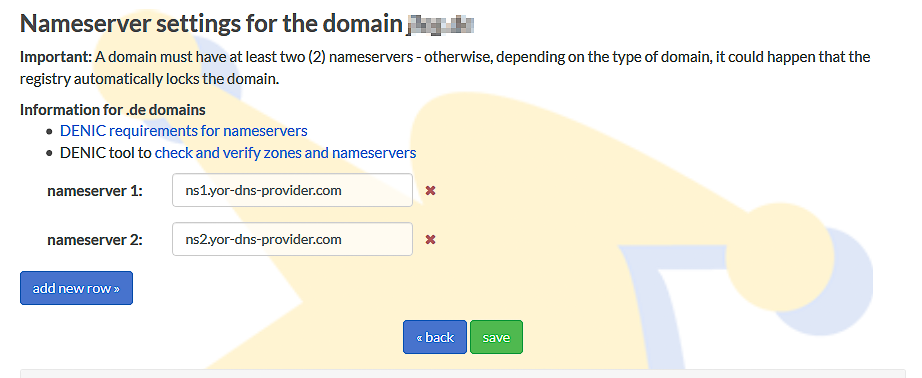
[**Change the name servers**](https://joker.com/faq/books/jokercom-faq-en/page/adding-name-servers-to-your-domain#bkmrk-1.-on-your-dashboard) for the domain to point to the name servers of the <abbr class="glossary" title="Domain Name Server">DNS</abbr> hosting provider.

It should look like this now:
![change name servers](https://joker.com/faq/uploads/images/gallery/FAQ_media/DNS/dnssec-1.png "change name servers")

This change may take some time to propagate through the larger <abbr class="glossary" title="Domain Name Server">DNS</abbr> infrastructure. Until the name server change has fully propagated, people may still see <abbr class="glossary" title="Domain Name Server">DNS</abbr> records coming from the previous name servers.

**At this point, you have a domain signed with DNSSEC at the <abbr class="glossary" title="Domain Name Server">DNS</abbr> hosting provider, and you have changed the records at Joker.com to point to the name servers of the <abbr class="glossary" title="Domain Name Server">DNS</abbr> hosting provider.**

Almost done!

If you now run your domain through the [**DNSSEC analyzer tool**](https://dnssec-analyzer.verisignlabs.com/ "https://dnssec-analyzer.verisignlabs.com/"), you will still see a problem: "***No DS records found***"

This means, you still have to create a so-called ***Delegation Signer (DS)*** record at **Joker.com**.

##### 4. Create DS record at Joker.com

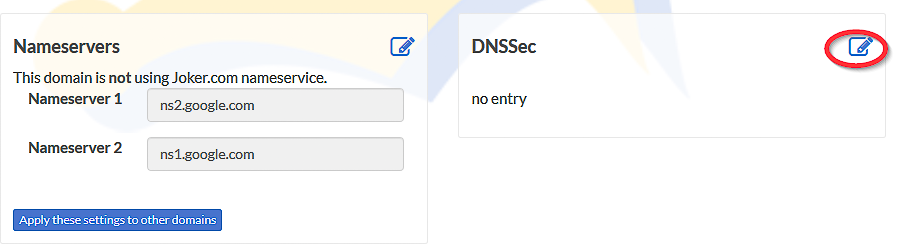
- again, visit Joker.com, click "Modify" next to your domain name
- You will now find your name servers listed and a DNSSEC section:
![change name servers](https://joker.com/faq/uploads/images/gallery/FAQ_media/DNS/dnssec-2.png "change name servers")

- click on '![](https://joker.com/faq/uploads/images/gallery/2023-09/2023-09-29-16-40-46-window.png "Edit name servers")' at section **DNSSEC**
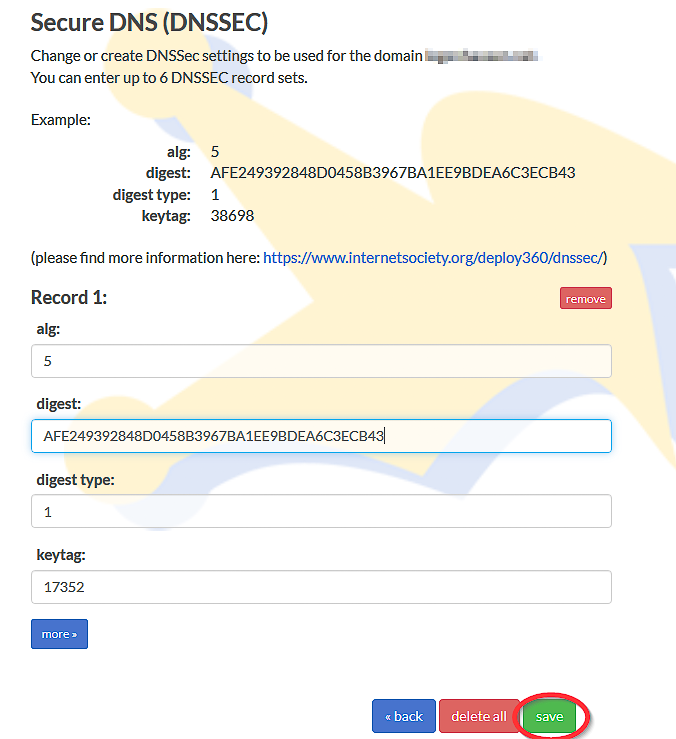
- it will then look like this - please check if the information corresponds with what you got in step 2 above:
![change name servers](https://joker.com/faq/uploads/images/gallery/FAQ_media/DNS/dnssec-3.png "change name servers")

- <div class="li">tag is derived from the key (provided by <abbr data-original-title="Domain Name System" title="">DNS</abbr> operator)</div>
- <div class="li">digest type is 1 (SHA-1, deprecated) or 2 (SHA-256)</div>
- digest itself: up to 40 hex digits for SHA-1 and up to 64 hex digits for SHA-256
- Press "save", and you are done - DNSSEC is enabled on your domain.

##### 5. Finally, **verify that DNSSEC works**

using a tool such as Verisign Labs’ [DNSSEC Analyzer](http://dnssec-debugger.verisignlabs.com/). It should show nice green check marks now - but please keep in mind, that your changes will take some time until they become active.

**Having followed these steps, you have DNSSEC working on a domain registered with Joker.com, using name servers from an external name service provider.**

Meanwhile, there is good news: **You now also are able to use DNSSEC with the regular Joker.com name servers** as well, free of charge! This of course is probably much simpler for you, since you do not have to maintain external name server records, and you can make use of DNSSEC fully integrated into Joker.com's web portal.